A CI/CD pipeline is an automated process that helps developers build, test, and deploy software faster and more reliably. Instead of manually deploying code (which is slow and error-prone), CI/CD allows teams to:
- Automatically test every code change
- Deploy applications consistently
- Release software multiple times a day
This is why CI/CD is considered the
core of DevOps.
What Does CI/CD Stand For? 🔹 CI – Continuous Integration Continuous Integration means:
- Developers frequently push code to a shared repository
- Every code change is automatically built and tested
Goal: Catch bugs early.
🔹 CD – Continuous Delivery / Deployment There are two types of CD:
- Continuous Delivery:
Code is always ready to deploy (manual approval) - Continuous Deployment:
Code is deployed automatically to production
Goal: Release software faster and safer.
Why CI/CD Pipelines Are Important Without CI/CD:
- Deployments are manual
- Bugs reach production
- Releases are slow
With CI/CD:
- Faster releases
- Fewer bugs
- Better collaboration
- Higher system reliability
👉 CI/CD pipelines are
mandatory in modern engineering teams.
CI/CD Pipeline Workflow (Step-by-Step) A typical CI/CD pipeline follows this flow:
- Code Commit
- Developer pushes code to Git repository
- Build Stage
- Application is compiled or packaged
- Test Stage
- Unit tests, integration tests, security checks
- Artifact Creation
- Build artifacts or Docker images created
- Deployment
- Application deployed to staging or production
- Monitoring
- Logs and metrics monitored post-deployment
Common CI/CD Tools Used in DevOps Popular CI/CD Tools
- Jenkins
- GitHub Actions
- GitLab CI/CD
- Azure Pipelines
- AWS CodePipeline
Each tool follows the
same principles, only implementation differs.
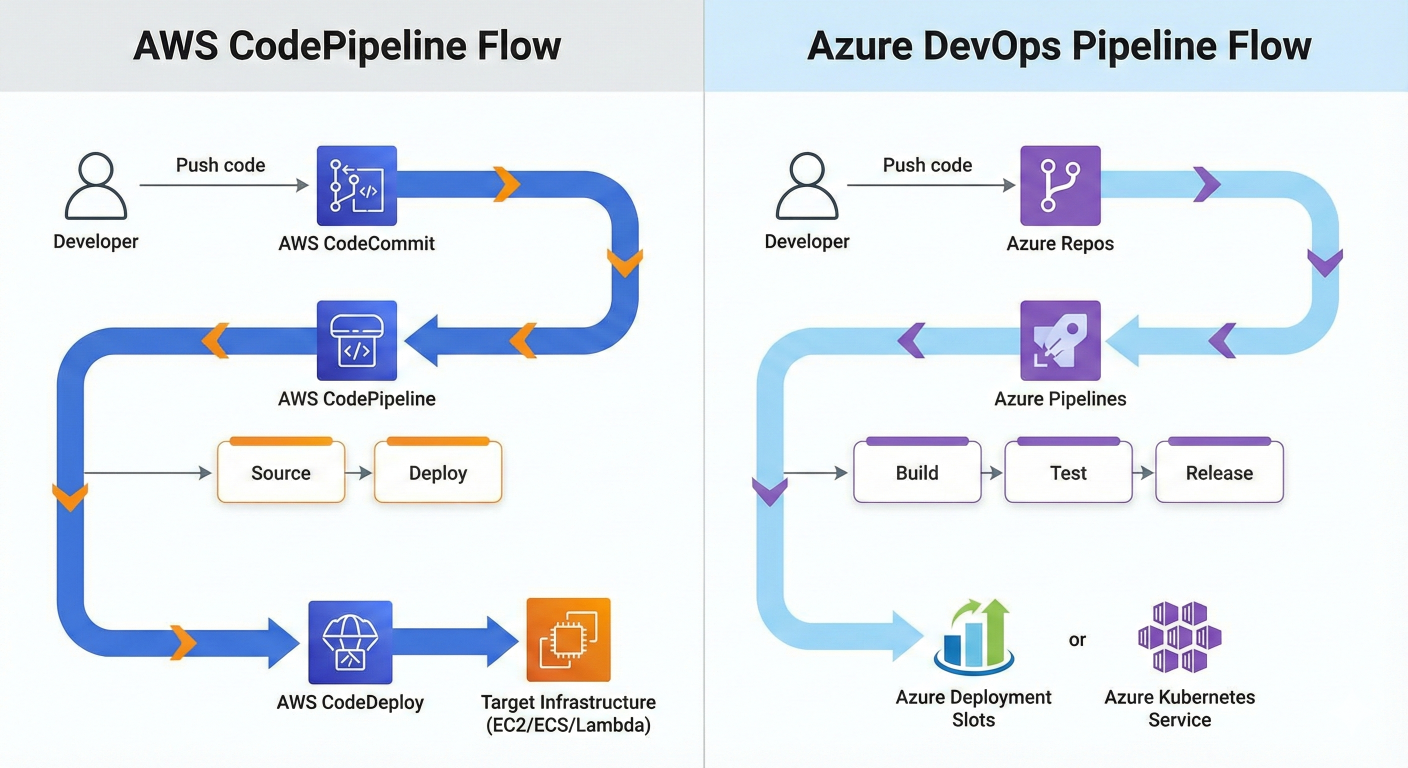
CI/CD in AWS DevOps (Real-World Example) A typical AWS CI/CD pipeline might include:
- Source: GitHub or CodeCommit
- Build: CodeBuild
- Deploy: CodeDeploy
- Orchestration: CodePipeline
- Monitoring: CloudWatch
This setup allows teams to deploy applications automatically to AWS infrastructure.
CI/CD in Azure DevOps (Real-World Example) A typical Azure DevOps pipeline includes:
- Azure Repos (source code)
- Azure Pipelines (CI/CD automation)
- Azure Artifacts
- Azure Monitor
Azure DevOps pipelines are heavily used in
enterprise environments.
CI/CD with Docker & Kubernetes Modern CI/CD pipelines often deploy:
- Docker containers
- Kubernetes clusters
Typical Flow:
- Build Docker image
- Push to container registry
- Deploy to Kubernetes using Helm
This enables:
- Scalability
- Rollbacks
- Zero-downtime deployments
Real-World CI/CD Use Case Imagine a web application where:
- A developer pushes code
- Tests run automatically
- Docker image is built
- App is deployed to Kubernetes
- Monitoring alerts trigger if issues occur
All of this happens
without manual intervention. That’s the power of CI/CD.
Common CI/CD Interview Questions
- What is CI/CD?
- Difference between CI and CD?
- What tools have you used?
- How do you roll back a failed deployment?
- How do you secure a CI/CD pipeline?
👉 These questions appear in
almost every DevOps interview.
How to Learn CI/CD the Right Way Don’t just memorize tools. To truly learn CI/CD:
- Build pipelines yourself
- Use real applications
- Deploy to AWS & Azure
- Automate everything
This is exactly how our
AWS & Azure DevOps Training teaches CI/CD.
Final Thoughts CI/CD pipelines are the
engine of DevOps. If you understand:
- How CI/CD works
- How to build pipelines
- How to deploy on AWS & Azure
You already have a
huge advantage in the DevOps job market.